
A few days ago, a client’s server went down.
CPU usage was at 100%, the server was barely responsive, and the hosting support couldn’t even restart it properly because it would come back up and very quickly hit 100% CPU again.
Their first suggestion was, of course, upgrade the server and move to a plan with double the CPU – which would have meant paying roughly 4× what the client was currently paying for hosting
I tend to get a little suspicious whenever hosting support tells me:
“You need more resources.”
Maybe. But why?
Because if you don’t know what’s actually causing the problem, throwing more resources at it won’t fix anything, it will just waste more money.
So I started investigating. And one of the screenshots they sent me showed something interesting.
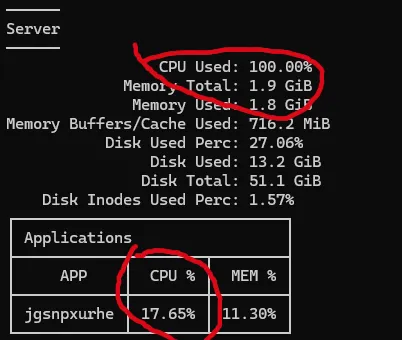
The server was indeed at 100% CPU, but the site was only at 17% CPU. Not only that, but looking over the resource usage for the last month, I saw both CPU and RAM usages were consistently under 40%. Until a few days before, when the CPU suddenly spiked to 100% and stayed there.
This was pretty clear: the problem wasn’t that the site had suddenly started using more resources — it hadn’t. The problem was that something else on the server was using up all the CPU.
So I pushed back and asked them to investigate the actual cause rather than just recommending another upgrade.
They finally did a deeper investigation. And guess what? They found it was one of the processes that ran on the server and that handles security scans, Imunify360, that got stuck in a restart loop.
It kept failing, restarting, failing again and restarting again.
All of that was happening at the server level, consuming CPU and effectively choking the entire machine. Nothing to do with the website. And no amount of resources would have fixed that issue, the loop would have eaten up all the CPU we would have been added.
Once they found and fixed the actual problem, the site and server went back to normal.
And this is why I get a slightly raised eyebrow when the first answer to a performance problem is:
“Upgrade your server.”
Sometimes you really do need more RAM. Or more more CPU. Because it happens that a website outgrows the server it’s running on.
But sometimes… your server is perfectly adequate and something else is broken.
And if you don’t find out what that something is, you can quite easily end up paying $40, $50, $160 or more every month for a bigger server… …and have exactly the same problem.
Because you’ve just given more resources to the problem instead of fixing it. And the frustrating part is that you might never know that you didn’t need the upgrade.
The website may appear to work better after the upgrade simply because you’ve given the problem more room to run. But if the underlying problem is still there, you’ve paid more without actually fixing it.
Before spending more money, I want to know:
What is using the resources?
Why is it using them?
And will adding more resources fix the underlying problem — or just make the same problem more expensive?
Working with websites for more than 20 years, I’ve seen enough weird things go wrong to know that the first explanation you get from support — whether it’s your host’s, your theme’s or a plugin’s — isn’t necessarily the right one.
And there’s a problem here if you’re not technical yourself.
How do you know whether the explanation you’re being given actually makes sense?
You don’t necessarily.
You can ask why. They can give you a perfectly reasonable-sounding technical explanation. They can send you screenshots showing that your server is at 100% CPU and tell you that you need more resources.
And unless you know what you’re looking at, it’s very difficult to tell whether that’s actually the cause of the problem or just a symptom.
That’s why sometimes you just need someone who can look at the problem independently and tell you whether the recommendation actually makes sense.
